PDF Expert integrates with many Mobile Device Management systems for smooth deployment and control. Contact us to learn available options.
PDF Expert: Built to Power Your Business
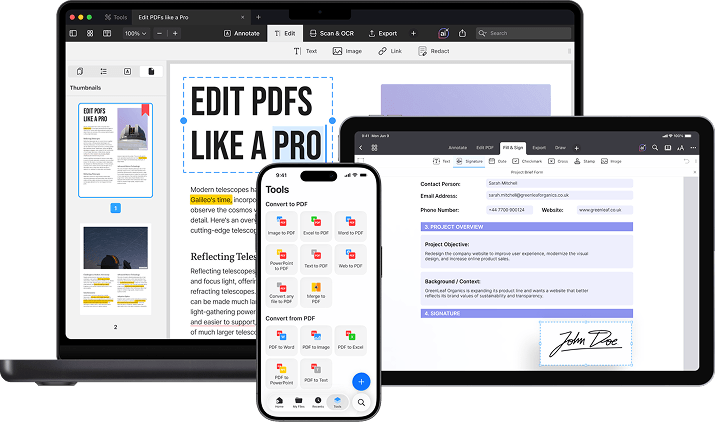
Edit, annotate, sign, and sync PDFs on Mac at the office or on iPhone and iPad in the field — one tool, every device, always in sync.
Trusted by teams at
Everything your team needs to work with PDFs
Mark it up anywhere
Edit, annotate, and redline PDFs right on iPhone or iPad - the devices your crew already has in hand on-site.
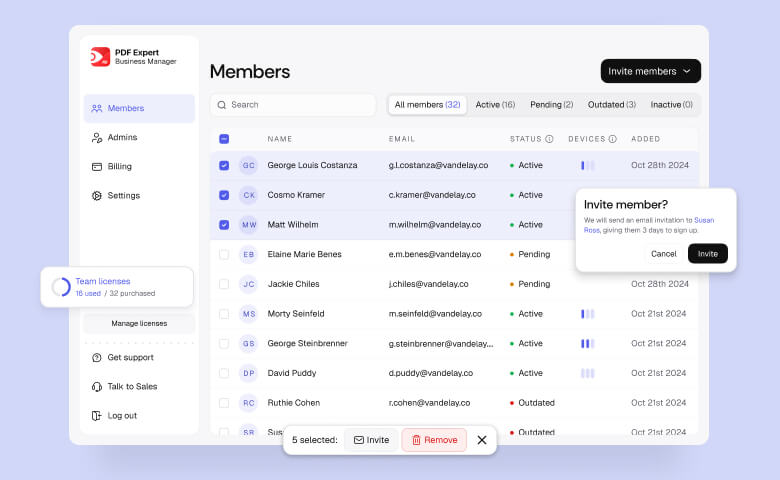
One dashboard, zero IT tickets
Manage seats, billing, and access yourself - add a new hire or offboard someone in seconds.
Seamless MDM Integration
Roll out PDF Expert across every device your crews use - no separate setup for the field vs. the office.
Keep sensitive documents locked down, even off-site
Password-protect contracts, block cloud access, and encrypt files so a lost tablet on a jobsite never means a leaked document.
Your whole team, managed from one place
Add seats, invite colleagues, and manage billing — all without involving IT.
Set up in minutes, not days.
Simple pricing that scales with your team
Choose your seats, pay online, and get instant access to the Business Manager.
Buy licences
From $80 per seat (before tax)
How many seats do you need?
Each member will get a license for up to 3 devices.
$1,440.00
/year (before tax)
- Cancel anytime before the next payment
- Licenses stay active until the end of billing period
Bring seamless workflows to any industry
Construction
Take accurate measurements, annotate blueprints, and sync field reports in real-time.

Automotive
Fill out inspection and repair forms right at the bay, attach photos, and get customer sign-off no re-typing notes back at the front desk.

Energy
Scan and OCR site reports so they're searchable, control who can access sensitive regulatory files, and keep every version organized for the next inspection.

Legal
Redact privileged information before it's shared, add Bates numbering for discovery, and block cloud access on confidential documents - all without sending files to a third-party server.

Wholesale
Digitally manage contracts, invoices, and purchase orders for smoother operations.

Trusted by Industry leaders
PDF Expert has been essential for my role in the custom home building business for three years. It's replaced inefficient methods, allowing me to easily annotate, edit, sign, and organize construction plans. Key features like combining PDFs and extracting specific pages for subcontractors have significantly improved my workflow. It's made document management faster and more organized, and I highly recommend it!

PDF Expert is a premier PDF document editor and manager.

The ability to easily import data from other apps into PDF Expert and export PDF documents via email makes PDFE very valuable.

FAQ
Is PDF Expert compatible with our existing MDM software?
Can I restrict cloud access for my team?
Absolutely. With PDF Expert, you can block third-party cloud storage access for enhanced security.
Does PDF Expert support offline work?
Yes! Work on your documents offline and sync updates when you reconnect.
What platforms does PDF Expert support?
PDF Expert supports macOS and iOS.
Can I use PDF Expert to fill out complex PDF forms?
Yes, PDF Expert allows you to effortlessly fill out even complex PDF forms, including those with JavaScript.
Is it possible to add electronic signatures to PDFs using PDF Expert?
Absolutely. You can easily add electronic signatures to PDFs with just a few taps, making it convenient to sign documents on the go. The signatures created in PDF Expert are classified as Simple Electronic Signatures under EU law (eIDAS). While these are great for most everyday documents, we recommend checking the legal requirements for your specific document or country to ensure a Simple Electronic Signature is the right fit for your needs.
How can I manage pages within a PDF document?
PDF Expert offers a range of page management tools. You can rearrange, delete, rotate pages, or merge entire PDF documents with ease.
Can I edit text, images, and links in a PDF with PDF Expert?
Yes, you can quickly edit text, images, and links within your PDF documents, making it easy to fix typos or update logos.
How do I purchase licenses for my team?
Click Buy Licences to create your team, choose the number of seats you need, and complete your purchase online. You'll get instant access to the Business Manager to invite teammates and manage your subscription.
Can I add or remove seats later?
Yes. You can add new seats as your team grows or reassign existing ones at any time from the Business Manager — no need to contact support.
Can I manage my team's licenses from one place?
Yes. The Admin Panel lets you manage seats, billing, and user access from a single dashboard, making it easy to keep your team up to date.
Does PDF Expert support MDM deployment?
Yes. PDF Expert supports Mobile Device Management (MDM), making it easy for IT teams to deploy and manage the app across their organization.
What's included in a Business license?
Every Business license includes PDF Expert for Mac and iOS, centralized team management, the Business manager, MDM support, and priority support.
What if my organization needs a large number of seats?
For larger deployments, our sales team can help with custom pricing, onboarding, and rollout. Contact us to discuss your organization's needs.
What premium features do my team members get access to?
Each member with an assigned license gets full access to PDF Expert on both iOS and macOS, including editing PDF text, images, and links; converting PDFs to Word, Excel, and PowerPoint; OCR (text recognition); signing documents; advanced annotation tools; and PDF translation.
Note: AI features (PDF Copilot) are not part of the initial release.
Will my team have access to PDF Expert's AI features?
Not at launch. AI features (including PDF Copilot) are not part of the initial PDF Expert Business Manager release.
Bring PDF Expert to your whole team
Grab your seats online and start working right away.