The go-to PDF editor
for Mac, iPad & iPhone

Built exclusively for Apple devices
4.7 • 211K ratings

What you can do in PDF Expert

Powerful PDF tools. Zero complexity.

Edit & annotate

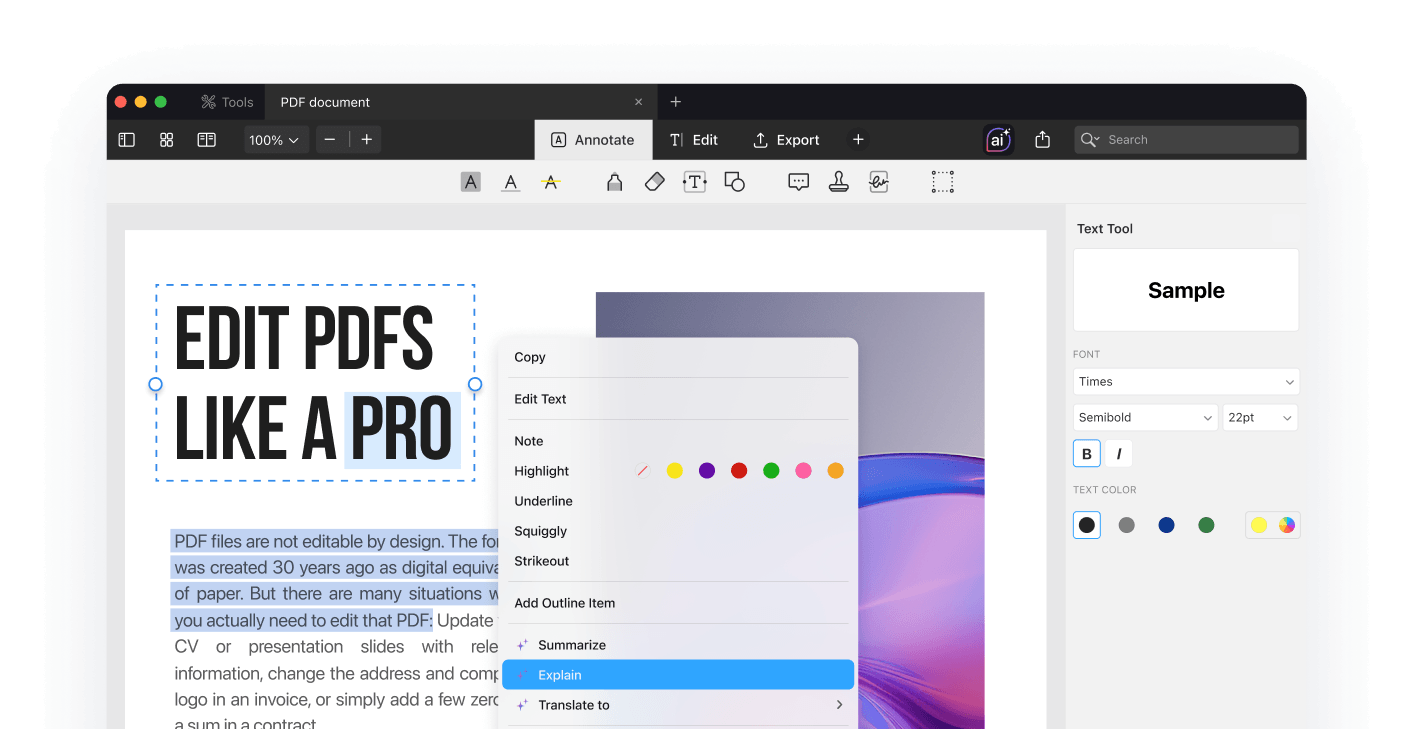
Edit text directly in your PDF, fix typos, adjust fonts, add comments, highlights, or drawings.

Fill & sign

Fill out PDF forms and sign documents in seconds with your electronic signature on Mac, iPhone, or iPad.

Merge and reorganize pages

Reorder, extract, delete, rotate, or merge pages to keep your PDFs organized and easy to manage.

Annotate Convert PDF Manage Pages PDF to Text Set Password Measure Excel to PDF Redline PDF to PowerPoint Edit PDF Redact PDF PDF to Word
Scan PDF to Image Merge to PDF Text to PDF New PDF PDF to Excel PowerPoint to PDF PDF Copilot Translate PDF Fill & Sign Image to PDF Reduce File Size
Draw Word to PDF Comment on PDF Web to PDF Annotate Convert PDF Manage Pages PDF to Text Set Password Measure Excel to PDF Redline

Key benefits

Real productivity gains

Works Offline

No internet required. Edit your documents anywhere.

Secure & Private

Your files stay on your device. No uploads, no tracking.

Native Apple Performance

Fast, smooth and optimized for Apple hardware.

Seamless iCloud sync

Automatically sync your PDFs across your Apple devices.

Built specifically for Apple

Professional PDF editing tools designed to get work done fast.

Ready to work smarter
with PDFs?

Frequently Asked Questions

Is PDF Expert free?

You can read and annotate PDFs for free. Advanced features, including editing, converting, OCR, and AI tools, are available with Premium plans. Choose between weekly, annual, or lifetime options.

What can I do with PDF Expert?

Edit text and images, fill out and sign forms, merge or split files, organize pages, convert PDFs, compress large documents, and protect files in one powerful app.

What AI features does PDF Expert include?

PDF Expert AI helps you summarize documents, list key points, explain complex sections, generate quizzes, extract insights, and understand long contracts, reports, or research papers in seconds. And this is just part of it. We continue expanding our AI capabilities with even more smart features.

Can I sign and fill documents?

Yes. Create your signature, complete forms, and securely sign PDFs on Mac, iPhone, and iPad. Your signed documents stay fully compatible with other PDF tools.

Can I use PDF Expert on all my devices?

Yes. Cross-device access across Mac, iPhone, and iPad is included with weekly and annual subscriptions. The lifetime plan applies to a single platform (Mac).

Who is PDF Expert for?

PDF Expert is built for everyone who works with PDFs. Professionals, students, teams, and individuals rely on it for speed, simplicity, and reliability.

Loved by millions

4.8 on the App Store

Best in class

I’ve used this app since it was first released. Very easy to navigate, and there is a seamless transition when utilizing it on different devices. It's a great place to save signatures for future use as well. Use it to sign and send to your boss for review instead of sending it to them for signature; that way, you don’t get a bunch of random scanned signature pages back.

Bronson 25

Marketing Director

Amazing

All the functionality you could want and cheaper than competitors.

Will299,792,458

Marketing Director

Amazing App

It is an amazing app with all the important features. And the cloud syncing functionality is seamless. It is a very good app to read and annotate PDFs.

Namit Batra

Marketing Director

Fantastic up for construction drawings

This app is very good for construction drawings, including measuring, adding photos, callouts, clouds, etc.

Adamnour

Top Notch

I want to thank the developer for creating this app, which unlocks the reader’s potential and time saving to the next level.

Speaknut

All I needed

The best PDF editor ever. Among all the apps I have used, this one is just what I wanted. Easy to use, everything is where it should be! Endless thanks to the creators of this masterpiece.

saeedrch

Best PDF tool

Great app. Easy to use and to manage many files.

JCL57

My go to pdf app.

It does all I need it to — intuitive UI, versatile and robust. And I’ve tried *many* competitors.

tweet77

7 Stars. Absolutely Brilliant and cannot fault!!

I have been using this app now for over 2 years or more and cannot fault it. The app just keeps improving every time and is so intuitive. The developers listen to feedback and provide far above expectations!

Datadezign

Over 30 Million

Users worldwide