Need to share a document while ensuring the layout looks identical across every screen? Converting RTF to PDF is the most reliable way to preserve your fonts and styling across all platforms. With PDF Expert, you can transform your Rich Text Format files into professional PDF documents in seconds without the privacy risks of online uploaders. It’s the fastest, most secure way to handle your documents locally on your device.
Why use PDF Expert as your RTF to PDF converter
While many RTF file converters exist, most require you to upload your documents to a cloud server. PDF Expert processes your files locally, ensuring your data never leaves your Mac or iPhone.
- Privacy first: No cloud uploads mean your confidential documents stay secure.
- Preserved quality: Formatting and layout are preserved as intended.
- PDF editor: Once converted, you can instantly sign, redact, or annotate your new PDF in PDF Expert.
- No limitations: Convert large files without worrying about the watermarks or file-size caps found in RTF to PDF online free tools.
Why convert Rich Text Format to PDF?
RTF is a great "middle-ground" format for text editing, but it lacks the professional polish of a PDF. Here is why you should transform RTF to PDF format:
- Universal compatibility: PDFs look the same on Windows, Mac, Linux, and mobile, whereas RTF formatting can shift between different text editors.
- Security: You can password-protect a PDF, which is not a standard feature for RTF files.
- Embedded media: While RTF can hold images, PDF handles high-resolution graphics, complex layouts, and embedded links much more efficiently.
- Print-ready: PDFs are the industry standard for printing, ensuring your margins and page breaks remain intact.
How to convert RTF to PDF on Mac
PDF Expert makes Rich Text PDF conversion seamless on macOS. You don’t even need to "save as"—you just let the app do the heavy lifting.
- Download PDF Expert and launch the app.
- Locate the RTF file you wish to convert in your Finder.
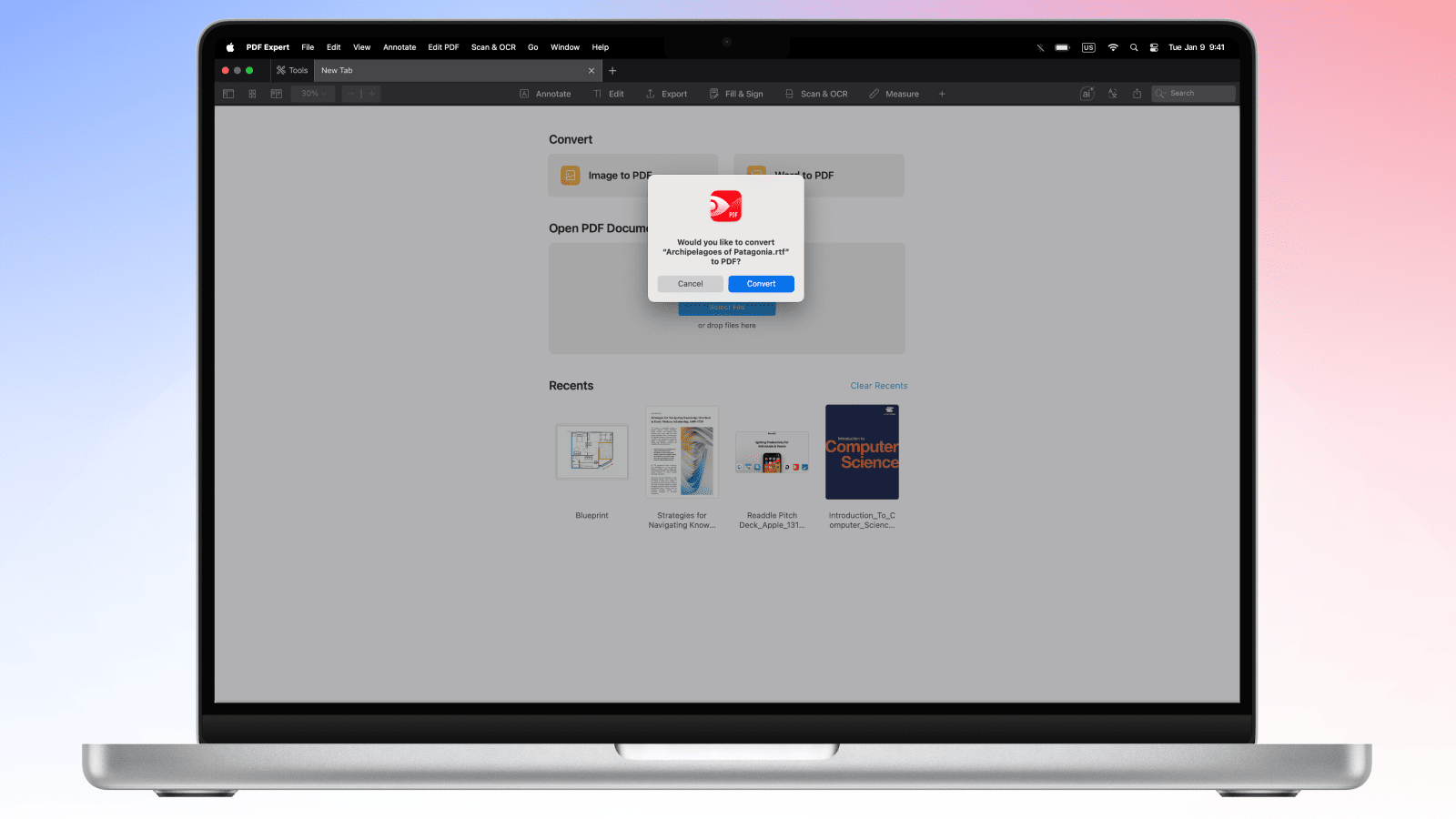
- Drag and drop the RTF file directly onto the PDF Expert icon in your Dock or the app’s New Tab. Alternatively, you can right-click on the RTF file and choose Open With > PDF Expert
- A prompt will appear asking if you'd like to create a PDF from this file. Click Convert.
- Your file is now a PDF! Go to File > Save to choose its final destination.
Pro Tip: Need to combine multiple documents? You can convert several RTF files and then use the Merge feature in PDF Expert to create one combined PDF file.
How to convert RTF to PDF on iPhone and iPad
Use these steps to convert RTF documents to PDF on the go:
- Open the PDF Expert app on your iPhone or iPad.
- Tap the blue plus (+) button at the bottom right.
- Select Files and choose the RTF document you want to convert.
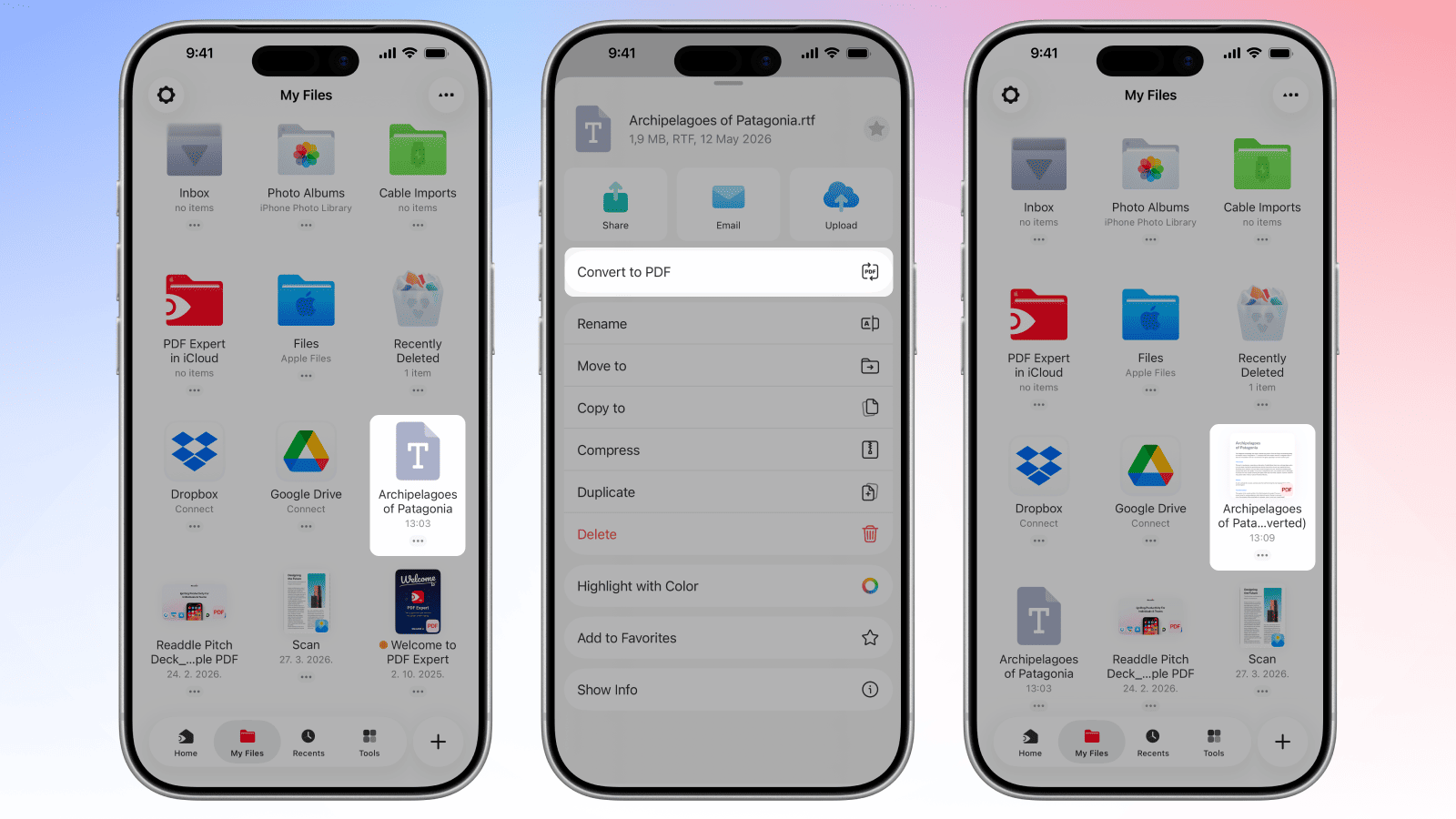
- Once the file is in your PDF Expert library, tap the three dots (...) on the file thumbnail.
- Select Convert to PDF.
- A new PDF version of your document will appear instantly, ready for editing, sharing or signing.
Rich Text Format to PDF conversion: FAQ
What is an RTF file, and why convert it to PDF?
An RTF (Rich Text Format) file is a document format that supports basic formatting, such as bold and different fonts, and is readable by almost all word processors. Converting it to PDF is essential when you want to lock that formatting so it cannot be accidentally edited or shifted when viewed by others.
Will my RTF formatting be preserved in PDF?
Yes. When using a professional RTF document converter like PDF Expert, the conversion allows saving the formatting. If the original RTF file has proper formatting, the alignment, font choices, and spacing will be the same in the PDF file.
Can I convert RTF files with embedded images to PDF?
Absolutely. PDF Expert handles images and objects in the Rich Text Format, ensuring they are rendered correctly in the resulting PDF without loss of resolution.
Can I convert RTF to other formats?
With PDF Expert, you can also convert an RTF file to a Word document or a JPG image. First, convert the RTF to PDF using PDF Expert as described above. Then, use the Export to feature and select Image or Word Document. Converting text directly to JPG often results in blurry text; going through PDF ensures high-resolution output.
Is RTF to PDF conversion secure with PDF Expert?
Yes, it is secure. PDF Expert conversion requests are processed on our server with the assistance of a third-party provider. Users’ security and privacy are among our top priorities. Before engaging any third party, we conduct a vendor assessment to ensure our providers meet GDPR compliance, ISO certification, and the highest industry standards. Your files are used only to deliver the service you requested. We do not read, persistently store, or share your file content, nor do our engaged processors. All files are deleted within 24 hours after completion of their conversion request.
To ensure additional security, you can add password protection directly in PDF Expert to restrict who can open or edit the resulting PDF.
